
Troubleshooting Steps
Experiencing a sudden malfunction with your Craftsman series vape can be frustrating, but don’t panic. Before you assume the worst, there are several troubleshooting steps you can take to identify the problem and potentially resolve it yourself.
Check the Battery
One of the first things to check when your Craftsman series vape stops working suddenly is the battery. A drained or faulty battery can be the culprit behind a sudden loss of power.
- Ensure the battery is properly installed and making good contact with the device.
- Check the battery level indicator, if your vape has one.
- Try charging the battery using the original charger or a compatible one.
- If you suspect the battery might be faulty, consider replacing it with a new one from a trusted source.
Inspect the Atomizer/Coils
Next, inspect the atomizer or coils. Over time, these components can become clogged or burnt, leading to reduced performance or complete failure.
Carefully unscrew the atomizer or remove the coil assembly and examine it for any debris, gunk, or signs of burning.
Clean the Device
Clean the device thoroughly. Debris, oil residue, or even dust buildup can interfere with the vape’s functionality.
Begin by disconnecting the battery and then gently wipe down all external surfaces of the device with a soft, lint-free cloth. Pay attention to the mouthpiece, air inlets, and any other crevices where residue might accumulate.
If you suspect internal clogs, carefully disassemble the atomizer or coil assembly according to the manufacturer’s instructions. Use a cotton swab dipped in isopropyl alcohol (at least 70% concentration) to gently clean the insides of the atomizer and coils. Avoid using harsh chemicals or abrasive materials that could damage the delicate components.
Allow all parts to dry completely before reassembling and powering on the device.
Ensure Proper Connection
Ensure proper connection is crucial for your Craftsman series vape to function correctly. Start by verifying that the battery is securely connected to the device. Make sure there are no loose connections or debris hindering contact.
Next, examine the mouthpiece and atomizer/coil assembly. Ensure they are properly attached and aligned. A misaligned connection can disrupt airflow and prevent the device from working.

Advanced Troubleshooting
When your Craftsman series vape suddenly stops working, a methodical troubleshooting approach can often pinpoint the issue. Start by examining the most common culprits: the battery and atomizer/coils.
Check for Firmware Issues
Advanced troubleshooting may involve checking for firmware issues. Firmware is software embedded in the device’s hardware, controlling its functions. Outdated or corrupted firmware can lead to unexpected behavior or complete malfunctions.
Many vape devices offer firmware update options either through a dedicated app or by connecting to a computer. Check the manufacturer’s website or user manual for instructions on how to update your Craftsman series vape’s firmware. A firmware update might resolve issues caused by software glitches.
Reset the Device
If you’ve tried the basic troubleshooting steps and your Craftsman Series vape still isn’t working, it might be time for more advanced techniques.
- Check the Firmware: Firmware is software that runs on your vape device. Outdated or corrupted firmware can cause malfunctions. Consult your user manual or the manufacturer’s website to see if a firmware update is available for your Craftsman Series vape.
- Reset the Device: Many vape devices have a reset function that can resolve software-related issues. Consult your user manual for instructions on how to perform a factory reset on your Craftsman Series vape. Keep in mind, resetting the device will erase any personalized settings.
Seeking Professional Help
Experiencing a sudden malfunction with your Craftsman series vape can be frustrating, but don’t panic. Before you assume the worst, there are several troubleshooting steps you can take to identify the problem and potentially resolve it yourself.
Warranty Coverage
If basic troubleshooting doesn’t resolve the issue, seeking professional help may be necessary. Look for a local vape shop specializing in repairs or contact the manufacturer’s customer support directly. They may offer repair services or guidance on finding an authorized service center.
Remember to check your Craftsman series vape’s warranty coverage before attempting any repairs yourself or seeking professional help. Warranty information can usually be found in the user manual or on the manufacturer’s website. A valid warranty might cover certain repair costs, depending on the nature of the problem and how long you’ve owned the device.
Contacting Craftsman Support
Experiencing a sudden malfunction with your Craftsman series vape can be frustrating, but don’t panic. Before you assume the worst, there are several troubleshooting steps you can take to identify the problem and potentially resolve it yourself.
One of the first things to check when your Craftsman series vape stops working suddenly is the battery. A drained or faulty battery can be the culprit behind a sudden loss of power.
- Ensure the battery is properly installed and making good contact with the device.
- Check the battery level indicator, if your vape has one.
- Try charging the battery using the original charger or a compatible one.
- If you suspect the battery might be faulty, consider replacing it with a new one from a trusted source.
Next, inspect the atomizer or coils. Over time, these components can become clogged or burnt, leading to reduced performance or complete failure.
Carefully unscrew the atomizer or remove the coil assembly and examine it for any debris, gunk, or signs of burning.
Clean the device thoroughly. Debris, oil residue, or even dust buildup can interfere with the vape’s functionality.
Begin by disconnecting the battery and then gently wipe down all external surfaces of the device with a soft, lint-free cloth. Pay attention to the mouthpiece, air inlets, and any other crevices where residue might accumulate.
If you suspect internal clogs, carefully disassemble the atomizer or coil assembly according to the manufacturer’s instructions. Use a cotton swab dipped in isopropyl alcohol (at least 70% concentration) to gently clean the insides of the atomizer and coils. Avoid using harsh chemicals or abrasive materials that could damage the delicate components.
Allow all parts to dry completely before reassembling and powering on the device.
Ensure proper connection is crucial for your Craftsman series vape to function correctly. Start by verifying that the battery is securely connected to the device. Make sure there are no loose connections or debris hindering contact.
Next, examine the mouthpiece and atomizer/coil assembly. Ensure they are properly attached and aligned. A misaligned connection can disrupt airflow and prevent the device from working.
When your Craftsman series vape suddenly stops working, a methodical troubleshooting approach can often pinpoint the issue. Start by examining the most common culprits: the battery and atomizer/coils.
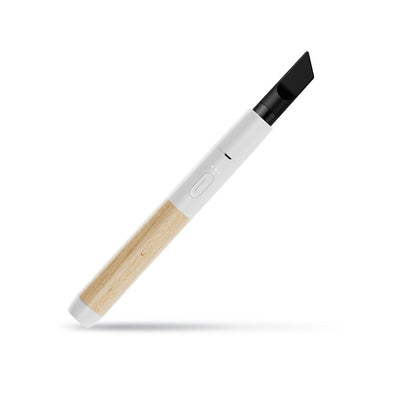
Advanced troubleshooting may involve checking for firmware issues. Firmware is software embedded in the device’s hardware, controlling its functions. Outdated or corrupted firmware can lead to unexpected behavior or complete malfunctions.
Many vape devices offer firmware update options either through a dedicated app or by connecting to a computer. Check the manufacturer’s website or user manual for instructions on how to update your Craftsman series vape’s firmware. A firmware update might resolve issues caused by software glitches.
If you’ve tried the basic troubleshooting steps and your Craftsman Series vape still isn’t working, it might be time for more advanced techniques.
- Check the Firmware: Firmware is software that runs on your vape device. Outdated or corrupted firmware can cause malfunctions. Consult your user manual or the manufacturer’s website to see if a firmware update is available for your Craftsman Series vape.
- Reset the Device: Many vape devices have a reset function that can resolve software-related issues. Consult your user manual for instructions on how to perform a factory reset on your Craftsman Series vape. Keep in mind, resetting the device will erase any personalized settings.
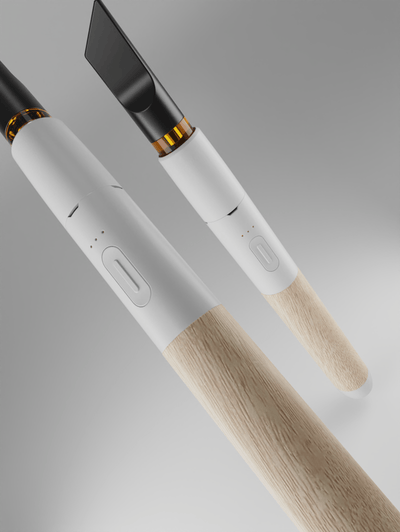
Experiencing a sudden malfunction with your Craftsman series vape can be frustrating, but don’t panic. Before you assume the worst, there are several troubleshooting steps you can take to identify the problem and potentially resolve it yourself.
If basic troubleshooting doesn’t resolve the issue, seeking professional help may be necessary. Look for a local vape shop specializing in repairs or contact the manufacturer’s customer support directly. They may offer repair services or guidance on finding an authorized service center.
Remember to check your Craftsman series vape’s warranty coverage before attempting any repairs yourself or seeking professional help. Warranty information can usually be found in the user manual or on the manufacturer’s website. A valid warranty might cover certain repair costs, depending on the nature of the problem and how long you’ve owned the device.
Shop now for the best Vessel Craftsman Series vapes

- What To Do If Your Craftsman Series Vape Stops Working Suddenly - January 19, 2026
- What Is The Best Non-Surgical Facelift For Over 60? - January 14, 2026
- What Is In A Lip Filler - January 13, 2026